pull up a stool
Your editor opens one project at a time. izakaya opens the whole bar. Point it at your code directory and every repo lines up along the counter — newest pours first — so a single glance tells you which ones have uncommitted work, which have drifted untouched for months, and which are clean and ready to ship.
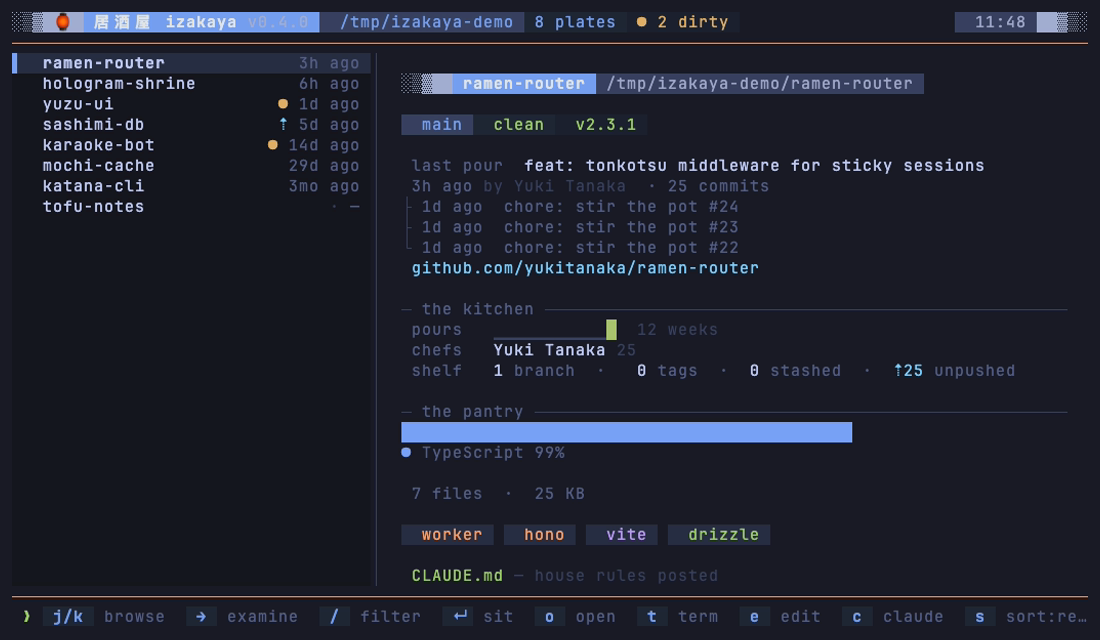
Sit down at any plate and the panel fills in: a Starship-shaped git ribbon, the
last few commits, a 12-week activity sparkline, the languages and size on disk,
the stack it's built on, and whether the kitchen has posted its house rules
(AGENTS.md or CLAUDE.md). Browsing is read-only — the one thing that
ever moves a repo is the market run, and it only fetches and fast-forwards. Press ↵ and the iz() wrapper sets your shell
down right inside the one you picked.
Then it answers the questions a work morning starts with. What changed while I was
gone? The bar remembers your last visit and tells you. What needs
me? The repo you're mid-way through sits at the top, the branch you forgot
you were on is named on its row, and a magenta mark shows where an agent is
working right now. Am I behind? A blue ⇣ marks every repo the
remote has moved past, and P brings the clean ones up to date in one pass.
Take me there. iz ramen seats your shell in
the repo before the bar even opens. What did I do yesterday?
izakaya --standup — every commit you made, across every repo.
the takeout window — for scripts, cron, and agents
The same scanner, no TTY. Nothing is written — not even the menu cache — and the exit codes do the talking.
# your standup: every commit you made since the last workday, across every repo
$ izakaya --standup

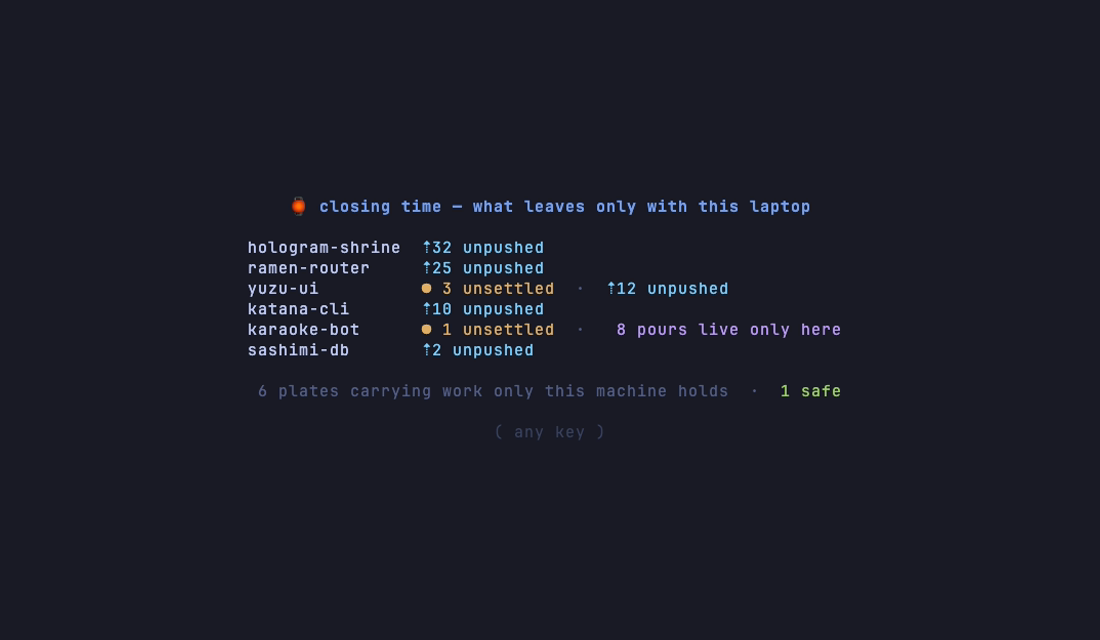
# what dies with this laptop — exits 1 when something is at risk, 0 when clean
$ izakaya --closing-time || say "the stove is still on"

# the whole menu as one JSON document — for your agent's first question
$ izakaya --report | jq '.plates[] | select(.dirty > 0) | .name'
One headless flag isn't takeout, because it writes: izakaya --pull is the
market run for cron — fetch, fast-forward only when clean, everything else set aside.
It exits 1 only when a remote couldn't be reached.
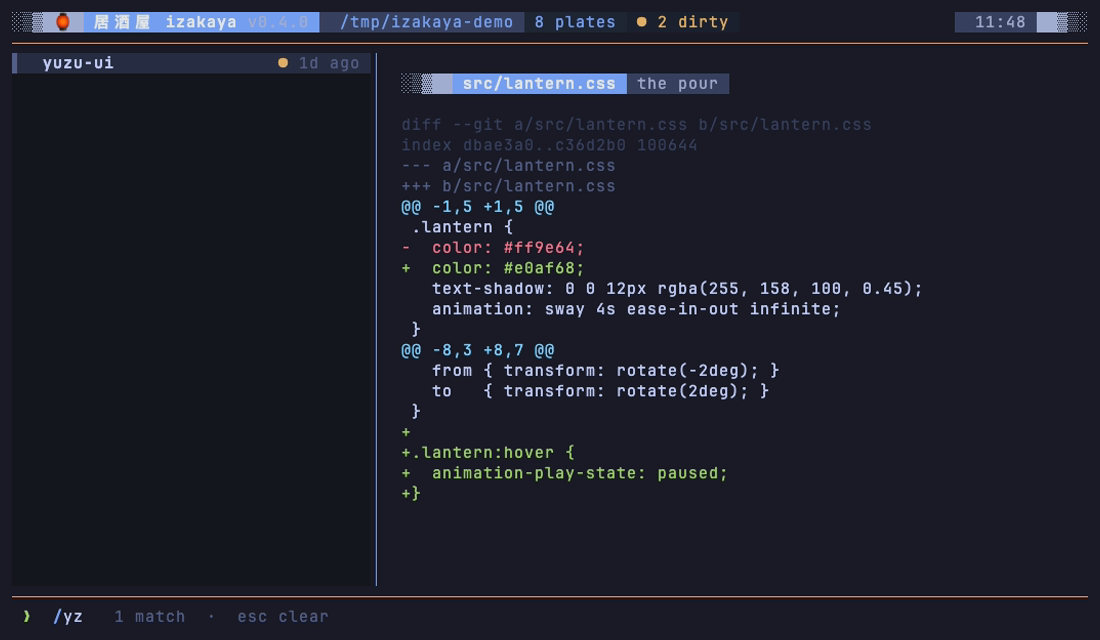
four frames — from tonight's service

straight from the bartender — quick answers
What is izakaya?
A zero-dependency terminal app that scans your code directory and serves its Git repositories and nested projects in one navigable dashboard.
Does izakaya modify my repositories?
Browsing, status inspection, and diff viewing are read-only. The one exception is the market run — p, P, or izakaya --pull — which fetches and fast-forwards only a repo that is clean, behind, and not ahead. Never a merge commit, rebase, stash, or force, and Git hooks stay off. Beyond that, it only launches a shell, editor, development session, or configured coding agent when you explicitly ask. And it's safe to browse a stranger's clone: commit messages, authors, and READMEs are stripped of terminal escape sequences before they reach your screen.
Can it write my standup?
izakaya --standup lists every commit you made on any local branch, across every repo, since the last workday — Mondays look back to Friday. It matches you by git name or email, so commits under a noreply address count too. Add --json for structured output.
Which coding agents work with it?
Claude Code and Codex can start or resume at the selected project. You can also configure Qwen Code, Kimi CLI, Aider, or another command-line agent.
What does it require?
Node.js 22 or newer on macOS or Linux. A truecolor terminal and Nerd Font provide the intended room, but there is no package runtime dependency or hosted service.
$ sit down
Nothing to pull from a registry — izakaya is a single file with zero dependencies. One curl pours it onto your PATH and the bar is open in under a minute, on macOS or Linux.
Pour the installer
One curl drops the single izakaya file on your PATH. Or clone the repo and npm link it yourself.
Open the bar
Run izakaya. It asks for your code dir on the first visit, then lays out the menu.
Add iz()
A tiny shell wrapper so ↵ — or iz ramen — drops you into the repo you picked. The installer can add it for you.
# the front door — drops the single `izakaya` file on your PATH (macOS · Linux)
$ curl -fsSL https://raw.githubusercontent.com/vajramatt/izakaya/main/scripts/install.sh | sh

# prefer to clone? it's one file, zero deps — link it yourself
$ git clone https://github.com/vajramatt/izakaya.git
$ cd izakaya && npm link

# open the bar — your code dir (it asks on first visit), or any path, or a name
$ izakaya
$ izakaya ~/work
$ iz ramen   # seats you in the one repo that matches

# the iz() wrapper — press ↵ on a plate and your shell cd's into the repo
# ~/.zshrc or ~/.bashrc (a fish variant lives in the README)
iz() {
  izakaya "$@"
  local seat="${XDG_CACHE_HOME:-$HOME/.cache}/izakaya/seat"
  [[ -f "$seat" ]] && cd -- "$(<"$seat")" && command rm -f -- "$seat"
}
Requirements: Node ≥ 22, a nerd font, and a truecolor terminal (Ghostty,
kitty, iTerm2…). Browsing the menu works anywhere Node runs. The launch keys split by
platform: open (o), browser (b) and copy-path (y) have
full parity on macOS and Linux (and y falls back to the terminal's own
OSC 52 clipboard, so it works over SSH); the terminal / editor / agent keys (t e a)
drive Ghostty on macOS (Terminal.app when Ghostty isn't installed) and kitty / wezterm / alacritty / foot — or your
$IZAKAYA_TERMINAL override — on Linux, and open tmux windows when you're
inside tmux. Windows is on the roadmap. Full docs, keys, and the demo recipe live in the
README.